

SubMiner
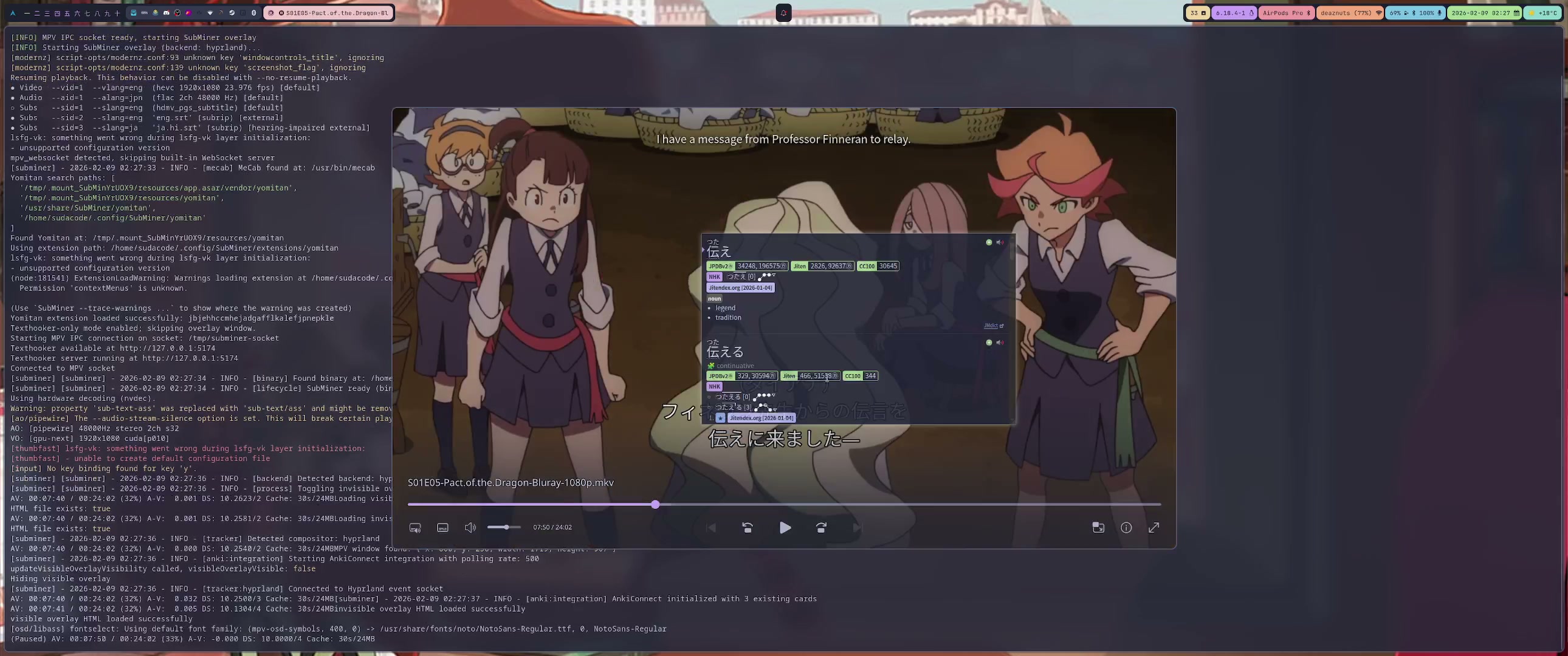
An all-in-one sentence mining overlay for MPV with AnkiConnect and dictionary (Yomitan) integration.
Features
- Real-time subtitle display from MPV via IPC socket
- Yomitan integration for fast, on-screen lookups
- Japanese text tokenization using MeCab with smart word boundary detection
- Integrated texthooker-ui server for use with Yomitan
- Integrated WebSocket server (if mpv_websocket is not found) to send lines to the texthooker
- AnkiConnect integration for automatic card creation with media (audio/image)
- Invisible subtitle position edit mode (
Ctrl/Cmd+Shift+P, arrow keys to adjust,Enter/Ctrl+Ssave,Esccancel)
Demo
Requirements
mpvwith IPC socket supportmecabandmecab-ipadic(recommended for Japanese tokenization)- Linux: Hyprland (
hyprctl) or X11 (xdotool+xwininfo) - macOS: Accessibility permission for window tracking
Optional but recommended: yt-dlp, fzf, rofi, chafa, ffmpegthumbnailer.
Install
Linux (AppImage)
Download the latest release from GitHub Releases:
wget https://github.com/ksyasuda/SubMiner/releases/download/v0.1.0/SubMiner-0.1.0.AppImage -O ~/.local/bin/SubMiner.AppImage
chmod +x ~/.local/bin/SubMiner.AppImage
wget https://github.com/ksyasuda/SubMiner/releases/download/v0.1.0/subminer -O ~/.local/bin/subminer
chmod +x ~/.local/bin/subminer
The subminer wrapper uses a Bun shebang, so bun must be on PATH.
From Source
git clone --recurse-submodules https://github.com/ksyasuda/SubMiner.git
cd SubMiner
make build
make install
If you already cloned without submodules:
cd SubMiner
git submodule update --init --recursive
For macOS builds, signing, and platform-specific details, see docs/installation.md.
Quick Start
- Copy and customize
config.example.jsoncto$XDG_CONFIG_HOME/SubMiner/config.jsonc(or~/.config/SubMiner/config.jsonc). - Start mpv with IPC enabled:
mpv --input-ipc-server=/tmp/subminer-socket video.mkv
- Launch SubMiner:
subminer video.mkv
# or
subminer https://youtu.be/...
Common Commands
subminer                          # pick video from current dir (fzf)
subminer -R                       # use rofi picker
subminer -d ~/Videos              # set source directory
subminer -r -d ~/Anime            # recursive search
subminer video.mkv                # launch with default mpv profile (subminer)
subminer -p gpu-hq video.mkv      # override mpv profile
subminer -T video.mkv             # disable texthooker
MPV Plugin (Optional)
cp plugin/subminer.lua ~/.config/mpv/scripts/
cp plugin/subminer.conf ~/.config/mpv/script-opts/
# or: make install-plugin
Requires mpv IPC: --input-ipc-server=/tmp/subminer-socket
Default chord prefix: y (y-y menu, y-s start, y-S stop, y-t toggle visible layer).
Overlay Jimaku shortcut default: Ctrl+Shift+J (shortcuts.openJimaku).
Documentation
Detailed guides live in docs/:
- Installation — Platform requirements, AppImage/macOS/source installs, mpv plugin
- Usage — Script vs plugin workflow, keybindings, YouTube playback
- Mining Workflow — End-to-end mining guide, overlay layers, card creation
- Configuration — Full config reference and option details
- Anki Integration — AnkiConnect setup, field mapping, media generation
- MPV Plugin — Chord keybindings, subminer.conf options, script messages
- Troubleshooting — Common issues and solutions
- Development — Building, testing, contributing
- Architecture — Service-oriented design, composition model, and modular renderer layout (
src/renderer/{modals,handlers,utils,...})
Third-Party Components
This project includes the following third-party components:
- Yomitan — GPL-3.0
- texthooker-ui — MIT
Acknowledgments
This project was inspired by GameSentenceMiner's subtitle overlay and Yomitan integration
License
GNU General Public License v3.0. See LICENSE.