mirror of
https://github.com/ksyasuda/SubMiner.git
synced 2026-02-28 06:22:45 -08:00

4.1 KiB
4.1 KiB

SubMiner
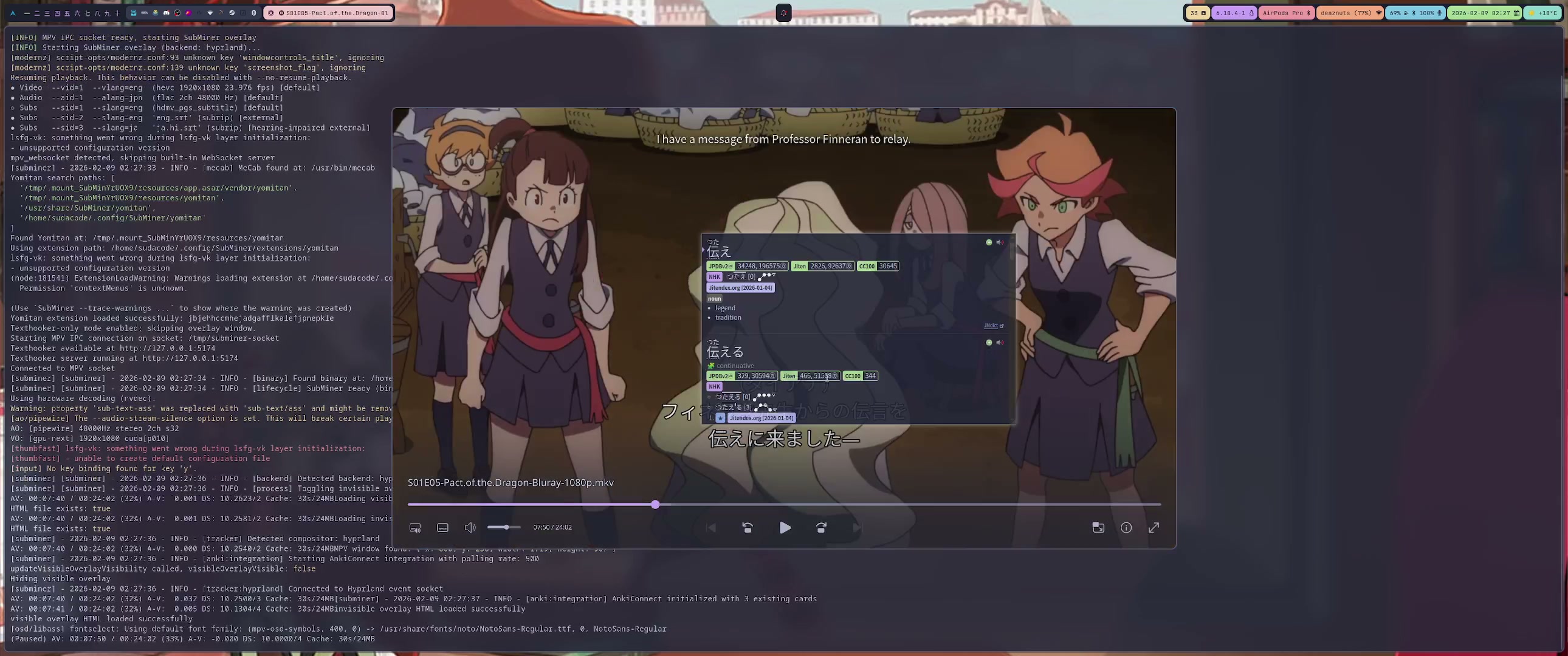
Immersion mining overlay for mpv — look up words, mine to Anki, and enrich cards with context without leaving the video.
Features
- Yomitan Integration — Hover subtitle words to trigger dictionary lookups in the player
- Anki Card Enrichment — Fills sentence, audio, screenshot, and translation on new cards automatically
- Dual-Layer Subtitles — Interactive visible overlay + invisible click-through layer aligned with mpv rendering
- N+1 Highlighting — Marks known vocabulary from your Anki deck so you can spot new words at a glance
- Texthooker & WebSocket — Built-in texthooker page with WebSocket streaming for external tools
- Subtitle Download & Sync — Search Jimaku, sync with alass or ffsubsync — all from the player
- Keyboard-Driven — Mine, copy, cycle display modes, and navigate from configurable shortcuts
- Japanese Tokenization — MeCab-powered word boundary detection with smart grouping
Requirements
mpvwith IPC socket supportmecabandmecab-ipadic- Linux: Hyprland (
hyprctl) or X11 (xdotool+xwininfo) - macOS: Accessibility permission for window tracking
Optional: yt-dlp, fzf, rofi, chafa, ffmpegthumbnailer
Install
Linux (AppImage)
wget https://github.com/ksyasuda/SubMiner/releases/download/v0.1.0/SubMiner-0.1.0.AppImage -O ~/.local/bin/SubMiner.AppImage
chmod +x ~/.local/bin/SubMiner.AppImage
wget https://github.com/ksyasuda/SubMiner/releases/download/v0.1.0/subminer -O ~/.local/bin/subminer
chmod +x ~/.local/bin/subminer
The subminer wrapper uses a Bun shebang, so bun must be on PATH.
From Source
git clone --recurse-submodules https://github.com/ksyasuda/SubMiner.git
cd SubMiner
make build && make install
For macOS builds and platform details, see the installation docs.
Quick Start
- Copy
config.example.jsoncto~/.config/SubMiner/config.jsonc - Start mpv with IPC:
mpv --input-ipc-server=/tmp/subminer-socket video.mkv - Launch SubMiner:
subminer video.mkv
subminer                        # pick video from cwd (fzf)
subminer -R                     # rofi picker
subminer -d ~/Videos            # set source directory
subminer -r -d ~/Anime          # recursive search
subminer -p gpu-hq video.mkv    # override mpv profile
subminer -T video.mkv           # disable texthooker
subminer https://youtu.be/...   # YouTube playback
MPV Plugin
cp plugin/subminer.lua ~/.config/mpv/scripts/
cp plugin/subminer.conf ~/.config/mpv/script-opts/
# or: make install-plugin
Default chord prefix: y (y-y menu, y-s start, y-S stop, y-t toggle overlay).
Jimaku shortcut: Ctrl+Shift+J.
Documentation
Full guides at docs/: Installation · Usage · Mining Workflow · Configuration · Anki Integration · MPV Plugin · Troubleshooting · Architecture
Acknowledgments
- GameSentenceMiner — Inspiration for the overlay and Yomitan integration
- Jimaku.cc — Japanese subtitle provider
- mpvacious, Anacreon-Script, autosubsync-mpv — Mining and sync logic ported to TypeScript
Third-party: Yomitan · texthooker-ui · yomitan-jlpt-vocab · Jiten Frequency Dictionary