📒 Markdown template
→ Full specification
✓ embed()
📒 Markdown template | |
|---|---|
| A template capable of rendering markdown from a given template file. | |
| Supported features → Full specification |
📰 ✒️ 🗼 📌 🐤 ✓ embed() |
| 👤 Users, 👥 Organizations | |
| #️⃣ JSON, 🔠 Markdown, 🔠 Markdown (PDF) | |
|
|
|
|
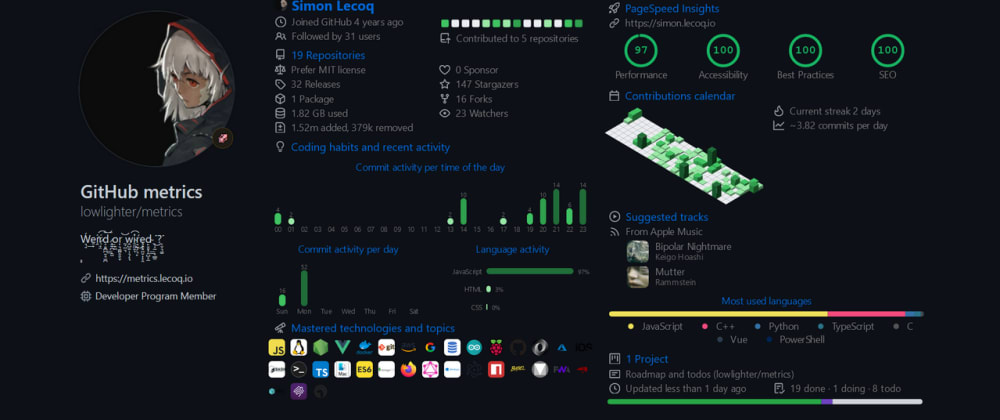
Metrics v3.0, the ultimate tool to pimp your GitHub profile! |
|---|---|
|
Metrics is an extensive SVG images generator plugged with various APIs (GitHub, Twitter, Spotify, ......
Published on 4 Jan 2021 |
 > 💡 The `plugin_` prefix can be dropped for convenience
> 💡 The `embed()` function does not have `🗃️ base` plugin enabled by default. To use it, it is required to explicitely pass them through `base` option.
## ℹ️ Examples workflows
```yaml
name: Example
uses: lowlighter/metrics@latest
with:
template: markdown
filename: metrics.markdown.md
markdown: metrics.markdown.template.md
config_output: markdown
token: ${{ secrets.METRICS_TOKEN }}
```
```yaml
name: Example with plugins configuration for embed use
uses: lowlighter/metrics@latest
with:
template: markdown
filename: metrics.markdown.full.md
markdown: >-
https://raw.githubusercontent.com/lowlighter/metrics/master/source/templates/markdown/example.md
config_output: markdown
plugin_activity: 'yes'
plugin_activity_limit: 7
plugin_activity_days: 0
plugin_activity_filter: issue, pr, release, fork, review, ref/create
plugin_posts: 'yes'
plugin_posts_source: dev.to
plugin_posts_descriptions: 'yes'
plugin_posts_covers: 'yes'
plugin_posts_limit: 2
plugin_rss: 'yes'
plugin_rss_source: https://news.ycombinator.com/rss
plugin_rss_limit: 4
plugin_tweets: 'yes'
plugin_tweets_token: ${{ secrets.TWITTER_TOKEN }}
plugin_tweets_user: github
plugin_tweets_attachments: 'yes'
plugin_tweets_limit: 2
plugin_topics: 'yes'
plugin_topics_limit: 24
plugin_isocalendar: 'yes'
plugin_languages: 'yes'
token: ${{ secrets.METRICS_TOKEN }}
```
```yaml
name: Example (pdf output)
uses: lowlighter/metrics@latest
with:
template: markdown
filename: metrics.markdown.pdf
markdown: >-
https://raw.githubusercontent.com/lowlighter/metrics/master/source/templates/markdown/example.pdf.md
config_output: markdown-pdf
plugin_rss: 'yes'
plugin_rss_source: https://news.ycombinator.com/rss
plugin_rss_limit: 4
plugin_isocalendar: 'yes'
config_twemoji: 'yes'
config_padding: 5%
token: ${{ secrets.METRICS_TOKEN }}
```
> 💡 The `plugin_` prefix can be dropped for convenience
> 💡 The `embed()` function does not have `🗃️ base` plugin enabled by default. To use it, it is required to explicitely pass them through `base` option.
## ℹ️ Examples workflows
```yaml
name: Example
uses: lowlighter/metrics@latest
with:
template: markdown
filename: metrics.markdown.md
markdown: metrics.markdown.template.md
config_output: markdown
token: ${{ secrets.METRICS_TOKEN }}
```
```yaml
name: Example with plugins configuration for embed use
uses: lowlighter/metrics@latest
with:
template: markdown
filename: metrics.markdown.full.md
markdown: >-
https://raw.githubusercontent.com/lowlighter/metrics/master/source/templates/markdown/example.md
config_output: markdown
plugin_activity: 'yes'
plugin_activity_limit: 7
plugin_activity_days: 0
plugin_activity_filter: issue, pr, release, fork, review, ref/create
plugin_posts: 'yes'
plugin_posts_source: dev.to
plugin_posts_descriptions: 'yes'
plugin_posts_covers: 'yes'
plugin_posts_limit: 2
plugin_rss: 'yes'
plugin_rss_source: https://news.ycombinator.com/rss
plugin_rss_limit: 4
plugin_tweets: 'yes'
plugin_tweets_token: ${{ secrets.TWITTER_TOKEN }}
plugin_tweets_user: github
plugin_tweets_attachments: 'yes'
plugin_tweets_limit: 2
plugin_topics: 'yes'
plugin_topics_limit: 24
plugin_isocalendar: 'yes'
plugin_languages: 'yes'
token: ${{ secrets.METRICS_TOKEN }}
```
```yaml
name: Example (pdf output)
uses: lowlighter/metrics@latest
with:
template: markdown
filename: metrics.markdown.pdf
markdown: >-
https://raw.githubusercontent.com/lowlighter/metrics/master/source/templates/markdown/example.pdf.md
config_output: markdown-pdf
plugin_rss: 'yes'
plugin_rss_source: https://news.ycombinator.com/rss
plugin_rss_limit: 4
plugin_isocalendar: 'yes'
config_twemoji: 'yes'
config_padding: 5%
token: ${{ secrets.METRICS_TOKEN }}
```