
SubMiner
Immersion mining overlay for mpv — look up words, mine to Anki, and enrich cards with context without leaving the video.
---
[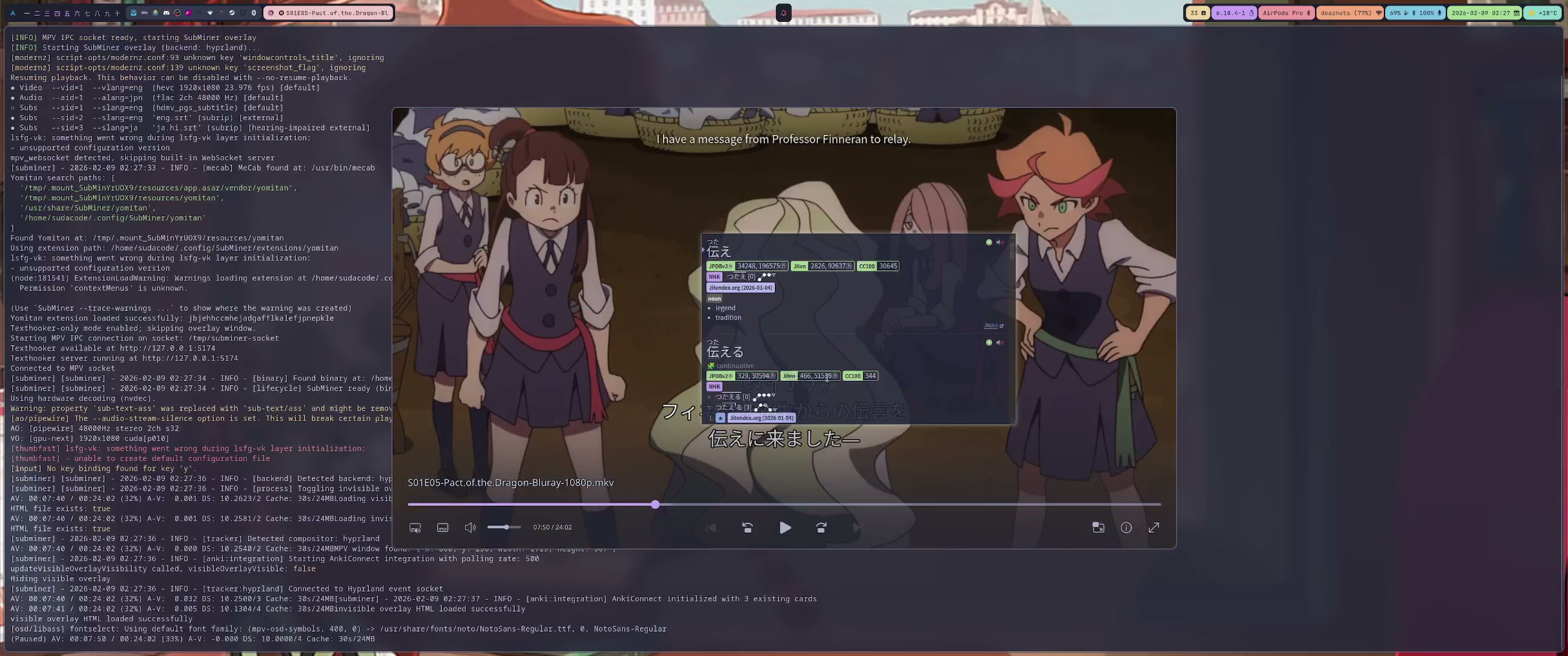](https://github.com/user-attachments/assets/9235a554-ea51-4284-b14b-7bbf3defaf58)
## Features
- **Yomitan Integration** — Hover subtitle words to trigger dictionary lookups in the player
- **Anki Card Enrichment** — Fills sentence, audio, screenshot, and translation on new cards automatically
- **Dual-Layer Subtitles** — Interactive visible overlay + invisible click-through layer aligned with mpv rendering
- **N+1 Highlighting** — Marks known vocabulary from your Anki deck so you can spot new words at a glance
- **Texthooker & WebSocket** — Built-in texthooker page with WebSocket streaming for external tools
- **Subtitle Download & Sync** — Search Jimaku, sync with alass or ffsubsync — all from the player
- **Keyboard-Driven** — Mine, copy, cycle display modes, and navigate from configurable shortcuts
- **Japanese Tokenization** — MeCab-powered word boundary detection with smart grouping
## Requirements
- `mpv` with IPC socket support
- `mecab` and `mecab-ipadic`
- Linux: Hyprland (`hyprctl`) or X11 (`xdotool` + `xwininfo`)
- macOS: Accessibility permission for window tracking
Optional: `yt-dlp`, `fzf`, `rofi`, `chafa`, `ffmpegthumbnailer`
## Install
### Linux (AppImage)
```bash
wget https://github.com/ksyasuda/SubMiner/releases/download/v0.1.0/SubMiner-0.1.0.AppImage -O ~/.local/bin/SubMiner.AppImage
chmod +x ~/.local/bin/SubMiner.AppImage
wget https://github.com/ksyasuda/SubMiner/releases/download/v0.1.0/subminer -O ~/.local/bin/subminer
chmod +x ~/.local/bin/subminer
```
The `subminer` wrapper uses a [Bun](https://bun.sh) shebang, so `bun` must be on `PATH`.
### From Source
```bash
git clone --recurse-submodules https://github.com/ksyasuda/SubMiner.git
cd SubMiner
make build && make install
```
For macOS builds and platform details, see the [installation docs](docs/installation.md).
## Quick Start
1. Copy [`config.example.jsonc`](config.example.jsonc) to `~/.config/SubMiner/config.jsonc`
2. Start mpv with IPC:
```bash
mpv --input-ipc-server=/tmp/subminer-socket video.mkv
```
3. Launch SubMiner:
```bash
subminer video.mkv
```
```bash
subminer # pick video from cwd (fzf)
subminer -R # rofi picker
subminer -d ~/Videos # set source directory
subminer -r -d ~/Anime # recursive search
subminer -p gpu-hq video.mkv # override mpv profile
subminer -T video.mkv # disable texthooker
subminer https://youtu.be/... # YouTube playback
subminer jellyfin -d # Jellyfin cast discovery mode
subminer doctor # dependency/config/socket diagnostics
subminer config path # print active config file path
subminer mpv status # mpv socket readiness check
```
### Launcher Subcommands
- `subminer jellyfin` / `subminer jf` — Jellyfin workflows (`-d` discovery, `-p` play, `-l` login)
- `subminer yt` / `subminer youtube` — YouTube shorthand (`-o/--out-dir`, `-m/--mode`)
- `subminer doctor` — quick environment health checks
- `subminer config path|show` — inspect active config path/content
- `subminer mpv status|socket|idle` — mpv socket and idle-launch helpers
- `subminer texthooker` — texthooker-only shortcut
Use `subminer