SubMiner logo # SubMiner ## Turn mpv into a sentence-mining workstation. Look up words with Yomitan, export to Anki in one key, track your immersion — all without leaving mpv. [![License: GPL v3](https://img.shields.io/badge/license-GPLv3-1a1a2e?style=flat-square)](https://www.gnu.org/licenses/gpl-3.0) [![Platform](https://img.shields.io/badge/platform-Linux%20·%20macOS%20·%20Windows-1a1a2e?style=flat-square)](https://github.com/ksyasuda/SubMiner) [![Docs](https://img.shields.io/badge/docs-docs.subminer.moe-e6a817?style=flat-square)](https://docs.subminer.moe) [![AUR](https://img.shields.io/aur/version/subminer-bin?style=flat-square&color=1a1a2e)](https://aur.archlinux.org/packages/subminer-bin) [![SubMiner demo](./assets/minecard.webp)](./assets/minecard.mp4)



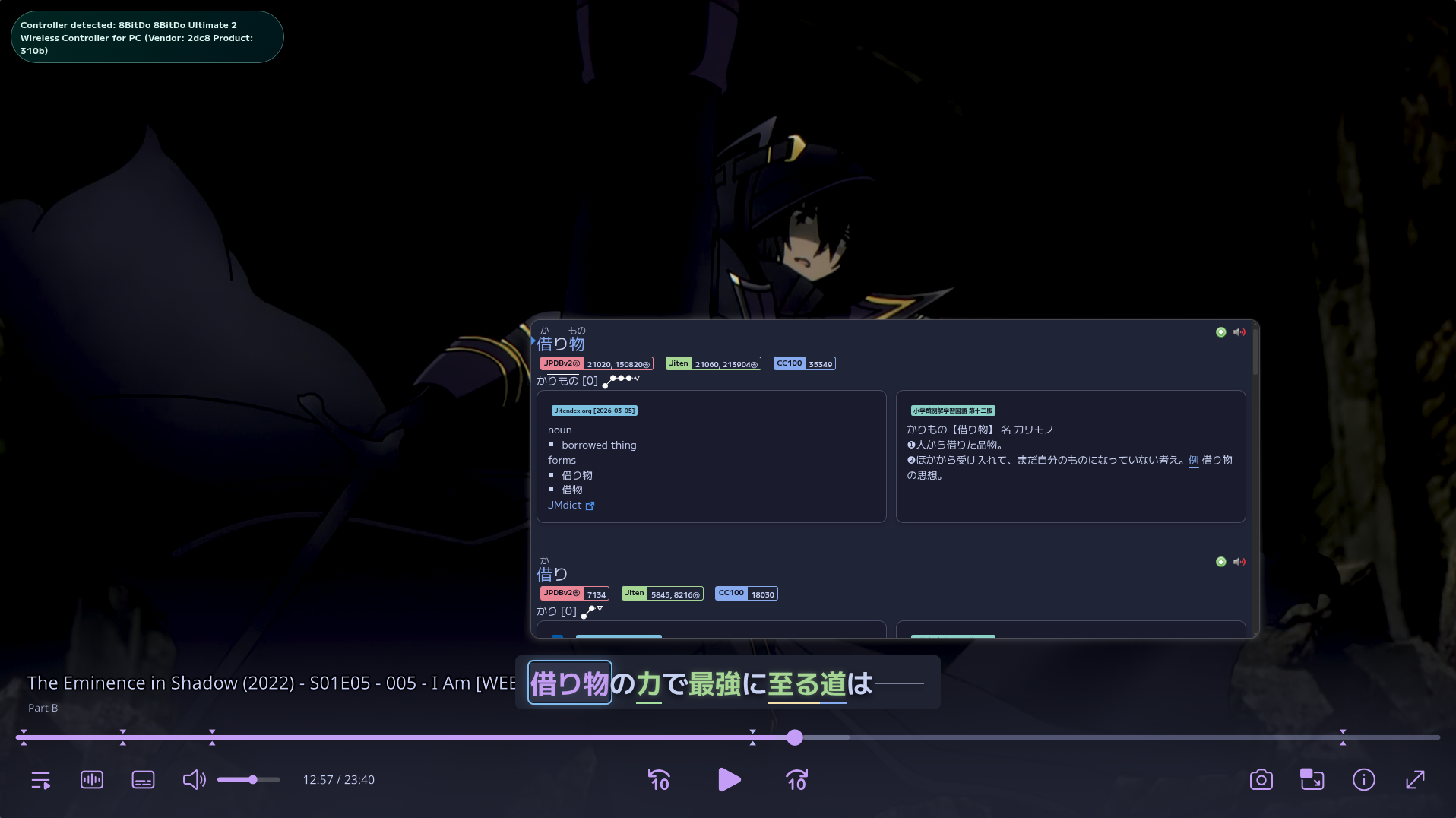
## How It Works SubMiner runs as an invisible Electron overlay on top of mpv. Subtitles render as an interactive layer. Move your cursor over any word and trigger a [Yomitan](https://github.com/yomidevs/yomitan) lookup. Press one key to snapshot the sentence, audio, and screenshot into Anki via AnkiConnect. ## Features ### Dictionary Lookups Yomitan runs inside the overlay. Trigger a lookup on any word for full dictionary popups — definitions, pitch accent, frequency data — without ever leaving mpv.
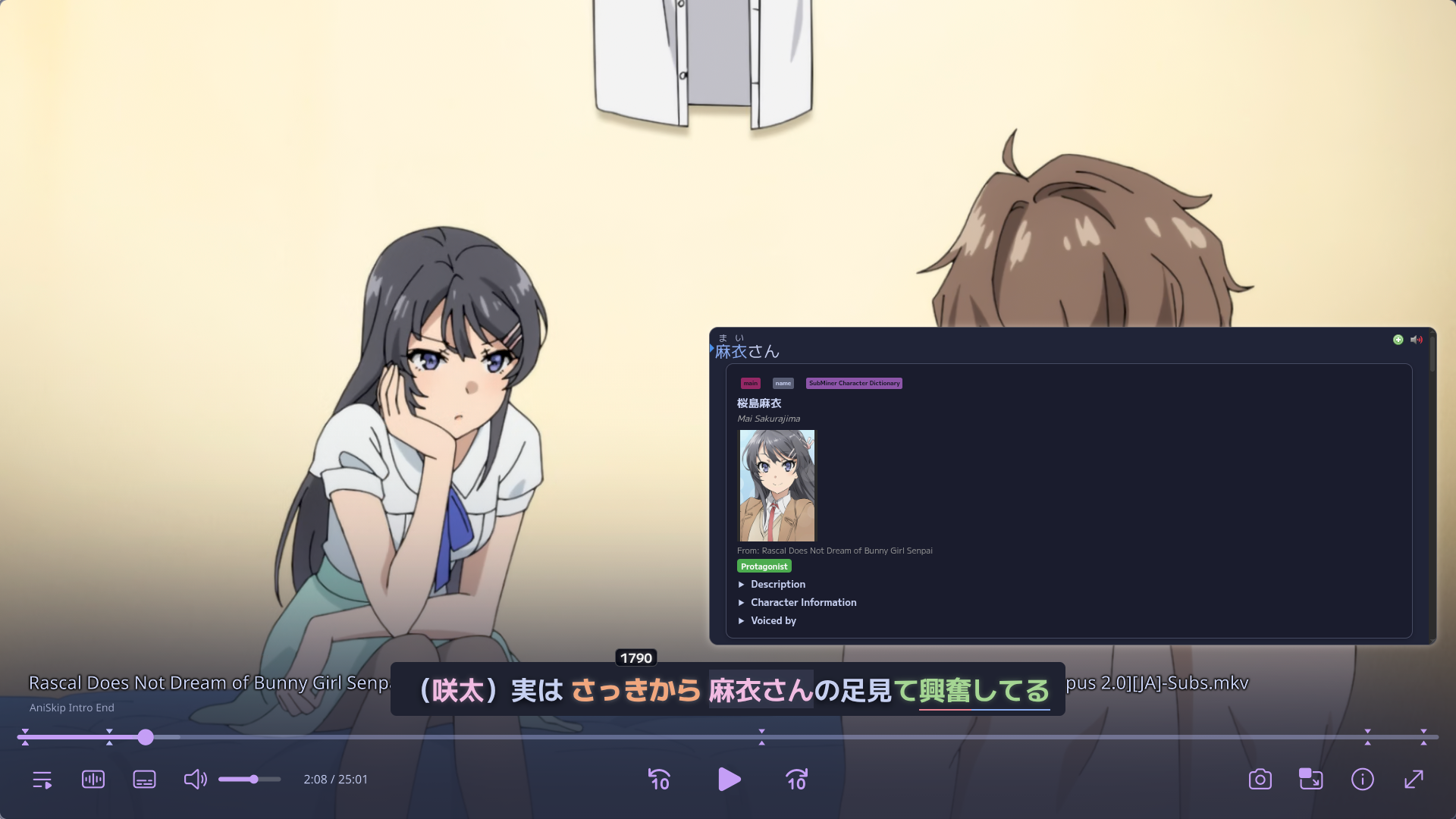
Yomitan dictionary popup over annotated subtitles in mpv

### Instant Anki Mining Create an Anki card with the sentence, audio clip, screenshot, and machine translation from the exact playback moment with one key press, click, or controller input.
Anki card created from SubMiner with sentence, audio, and screenshot

### Reading Annotations Real-time subtitle annotations with frequency highlighting, JLPT tags, N+1 targeting, and a character name dictionary. Known words fade back; new words stand out. Grammar-only tokens render as plain text so you focus on what matters.
Annotated subtitles with frequency coloring, JLPT underlines, and N+1 targets

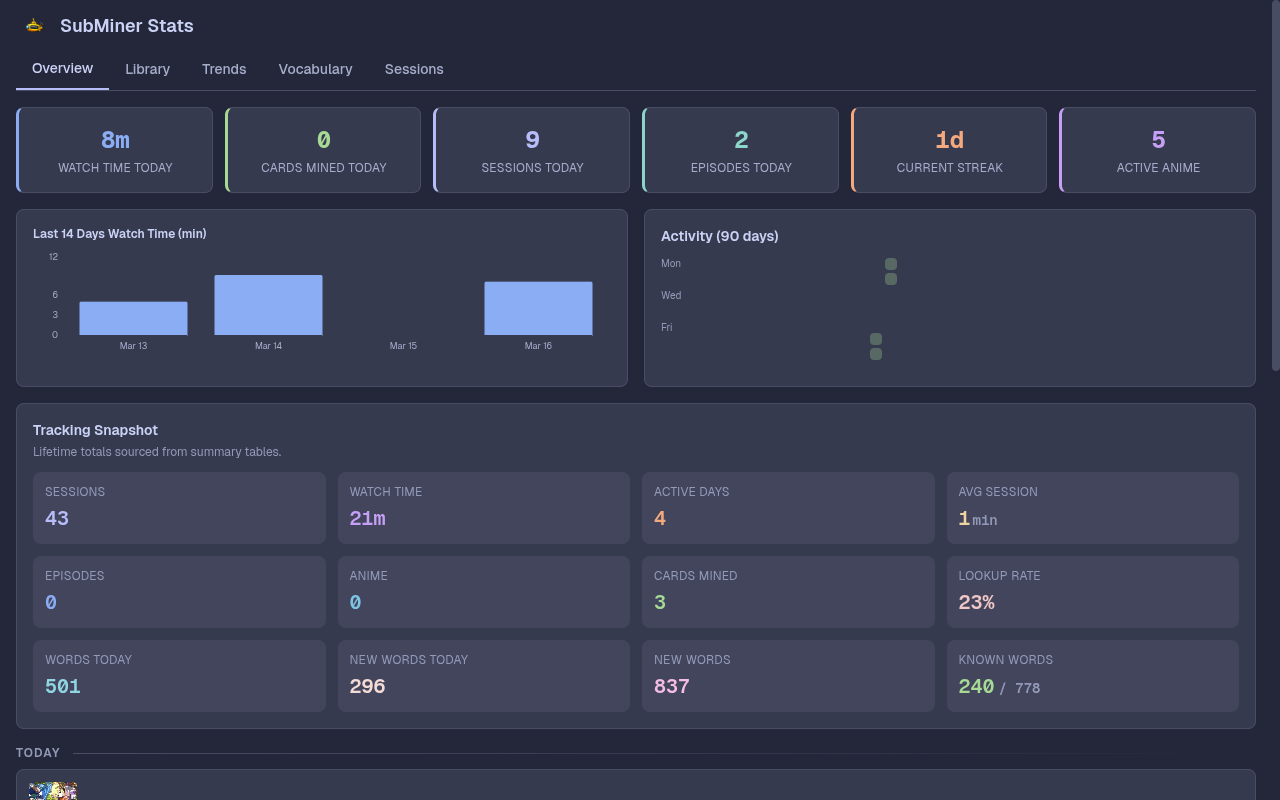
### Immersion Dashboard Local stats dashboard — watch time, anime library, vocabulary growth, mining throughput, session history, and trends. All stored locally, no third-party tracking.
Stats dashboard showing watch time, cards mined, streaks, and tracking data

### Integrations
AniList Automatic episode tracking and progress sync
Jellyfin Browse and launch media from your Jellyfin server
Jimaku Search and download Japanese subtitles
alass / ffsubsync Automatic subtitle retiming
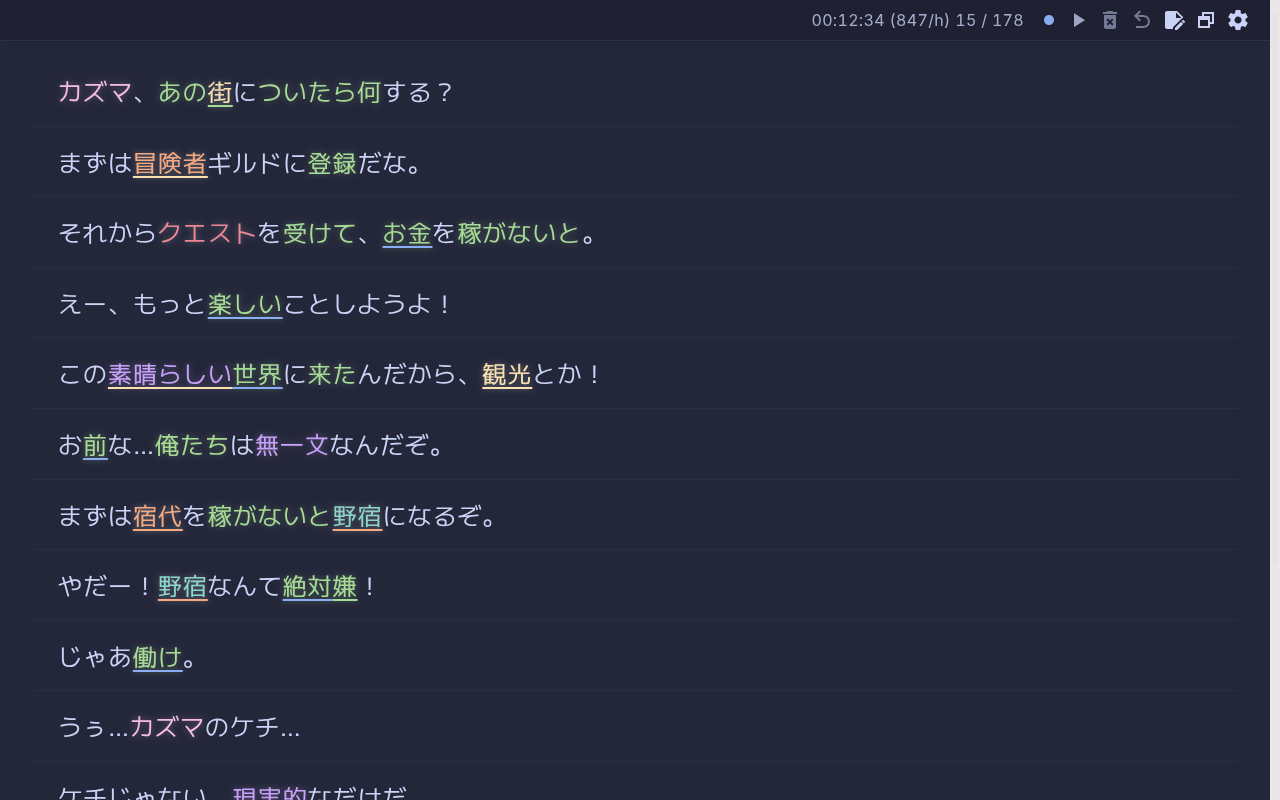
WebSocket Annotated subtitle feed for external clients (texthooker pages, custom tools)
Texthooker page receiving annotated subtitle lines via WebSocket

--- ## Requirements | | Required | Optional | | -------------- | --------------------------------------- | -------------------------------------- | | **Player** | [`mpv`](https://mpv.io) with IPC socket | — | | **Processing** | `ffmpeg`, `mecab` + `mecab-ipadic` | `guessit` (AniSkip) | | **Media** | — | `yt-dlp`, `chafa`, `ffmpegthumbnailer` | | **Selection** | — | `fzf` / `rofi` | > [!NOTE] > [`bun`](https://bun.sh) is required if building from source or using the CLI wrapper: `subminer`. Pre-built releases (AppImage, DMG, installer) do not require it. **Platform-specific:** | Linux | macOS | Windows | | ----------------------------------- | ------------------------ | ------------- | | `hyprctl` or `xdotool` + `xwininfo` | Accessibility permission | No extra deps |
Arch Linux ```bash paru -S --needed mpv ffmpeg mecab-git mecab-ipadic # Optional paru -S --needed yt-dlp fzf rofi chafa ffmpegthumbnailer xdotool xorg-xwininfo # X11 / XWAYLAND paru -S --needed xdotool xorg-xwininfo ```
macOS ```bash brew install mpv ffmpeg mecab mecab-ipadic # Optional brew install yt-dlp fzf rofi chafa ffmpegthumbnailer ``` Grant Accessibility permission to SubMiner in **System Settings > Privacy & Security > Accessibility**.
Windows Install [`mpv`](https://mpv.io/installation/) and [`ffmpeg`](https://ffmpeg.org/download.html) and ensure both are on your `PATH`. For MeCab, install [MeCab for Windows](https://taku910.github.io/mecab/#download) with the UTF-8 dictionary.
--- ## Quick Start ### 1. Install
Arch Linux (AUR) ```bash paru -S subminer-bin ``` Or manually: ```bash git clone https://aur.archlinux.org/subminer-bin.git && cd subminer-bin && makepkg -si ```
Linux (AppImage) ```bash mkdir -p ~/.local/bin wget https://github.com/ksyasuda/SubMiner/releases/latest/download/SubMiner.AppImage -O ~/.local/bin/SubMiner.AppImage \ && chmod +x ~/.local/bin/SubMiner.AppImage wget https://github.com/ksyasuda/SubMiner/releases/latest/download/subminer -O ~/.local/bin/subminer \ && chmod +x ~/.local/bin/subminer ``` > [!NOTE] > The `subminer` wrapper uses a [Bun](https://bun.sh) shebang. Make sure `bun` is on your `PATH`.
macOS Download the latest DMG or ZIP from [GitHub Releases](https://github.com/ksyasuda/SubMiner/releases/latest) and drag `SubMiner.app` into `/Applications`.
Windows Download the latest installer or portable `.zip` from [GitHub Releases](https://github.com/ksyasuda/SubMiner/releases/latest). Make sure `mpv` is on your `PATH`.
From source See the [build-from-source guide](https://docs.subminer.moe/installation#from-source).
### 2. First Launch Run the app. On first launch SubMiner starts in the system tray, creates a default config, and opens a setup popup to install the mpv plugin and configure Yomitan dictionaries. ### 3. Mine ```bash subminer video.mkv # play video with overlay subminer --start video.mkv # explicit overlay start subminer stats # open immersion dashboard subminer stats -b # stats daemon in background ``` --- ## Documentation Full guides on configuration, Anki setup, Jellyfin, immersion tracking, and more: **[docs.subminer.moe](https://docs.subminer.moe)** --- ## Acknowledgments SubMiner builds on the work of these open-source projects: | Project | Role | | ------------------------------------------------------------------------------------------- | ----------------------------------------------------------------------- | | [Anacreon-Script](https://github.com/friedrich-de/Anacreon-Script) | Inspiration for the mining workflow | | [asbplayer](https://github.com/killergerbah/asbplayer) | Inspiration for subtitle sidebar and logic for YouTube subtitle parsing | | [Bee's Character Dictionary](https://github.com/bee-san/Japanese_Character_Name_Dictionary) | Character name recognition in subtitles | | [GameSentenceMiner](https://github.com/bpwhelan/GameSentenceMiner) | Inspiration for Electron overlay with Yomitan integration | | [jellyfin-mpv-shim](https://github.com/jellyfin/jellyfin-mpv-shim) | Jellyfin integration | | [Jimaku.cc](https://jimaku.cc) | Japanese subtitle search and downloads | | [Renji's Texthooker Page](https://github.com/Renji-XD/texthooker-ui) | Base for the WebSocket texthooker integration | | [Yomitan](https://github.com/yomidevs/yomitan) | Dictionary engine powering all lookups and the morphological parser | | [yomitan-jlpt-vocab](https://github.com/stephenmk/yomitan-jlpt-vocab) | JLPT level tags for vocabulary | ## License [GNU General Public License v3.0](LICENSE)